
Basic operations
The examples below cover the package’s basic functionalities, including how to build a temporal graph, slice it into snapshots, save and load graph objects to disk, and other inherited methods.
See also
All examples in this guide are also available as an interactive Jupyter notebook (open in Colab).
Build temporal graph
This package implements new
TemporalGraph
classes, which extend NetworkX graphs
to handle temporal (dynamic) data.
Let’s start by creating a simple directed graph using time as attribute key:
>>> import networkx_temporal as tx
>>>
>>> TG = tx.temporal_graph(directed=True)  # tx.TemporalMultiDiGraph()
>>>
>>> TG.add_edge("a", "b", time=0)
>>> TG.add_edge("c", "b", time=1)
>>> TG.add_edge("d", "c", time=2)
>>> TG.add_edge("d", "e", time=2)
>>> TG.add_edge("a", "c", time=2)
>>> TG.add_edge("f", "e", time=3)
>>> TG.add_edge("f", "a", time=3)
>>> TG.add_edge("f", "b", time=3)
>>>
>>> print(TG)

TemporalMultiDiGraph (t=1) with 6 nodes and 8 edges
Note that the resulting graph object reports a single time step t=1, as it has not yet been
sliced.
Hint
To allow multiple interactions between the same nodes over time, a
TemporalMultiGraph or
TemporalMultiDiGraph object is required. Otherwise, only a
single edge is allowed among pairs.
Import static graphs
Static graphs from NetworkX can be converted into temporal graphs with
from_static():
>>> import networkx as nx
>>>
>>> G = nx.DiGraph()
>>>
>>> G.add_nodes_from([
>>>     ("a", {"time": 0}),
>>>     ("b", {"time": 0}),
>>>     ("c", {"time": 1}),
>>>     ("d", {"time": 2}),
>>>     ("e", {"time": 3}),
>>>     ("f", {"time": 3}),
>>> ])
>>>
>>> G.add_edges_from([
>>>     ("a", "b", {"time": 0}),
>>>     ("c", "b", {"time": 1}),
>>>     ("d", "c", {"time": 2}),
>>>     ("d", "e", {"time": 2}),
>>>     ("a", "c", {"time": 2}),
>>>     ("f", "e", {"time": 3}),
>>>     ("f", "a", {"time": 3}),
>>>     ("f", "b", {"time": 3}),
>>> ])
>>>
>>> TG = tx.from_static(G)
>>> print(TG)

TemporalDiGraph (t=1) with 6 nodes and 8 edges
In the example above, both nodes and edges contain a time attribute, and slicing the graph
using either node-level or edge-level data will yield different results.
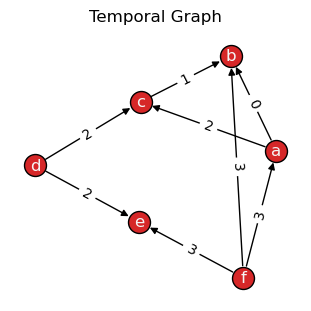
Let’s draw() the static graph:
>>> tx.draw(TG, layout="kamada_kawai", edge_labels="time", suptitle="Temporal Graph")
Slice temporal graph
Let’s use the slice() method to split the temporal
graph into a number of snapshots:
>>> TG = TG.slice(attr="time")
>>> print(TG)

TemporalDiGraph (t=4) with 6 nodes and 8 edges
>>> for t, G in enumerate(TG):
>>>     print(f"Snapshot t={t}: {G.order()} nodes, {G.size()} edges")

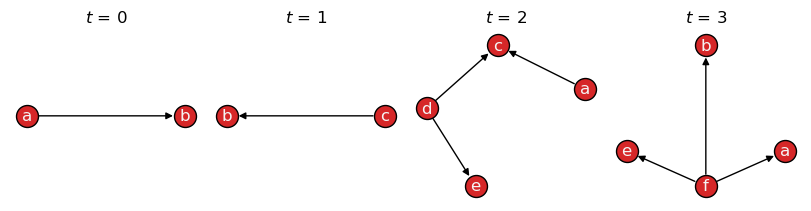
Snapshot t=0: 2 nodes, 1 edges
Snapshot t=1: 2 nodes, 1 edges
Snapshot t=2: 4 nodes, 3 edges
Snapshot t=3: 4 nodes, 3 edges
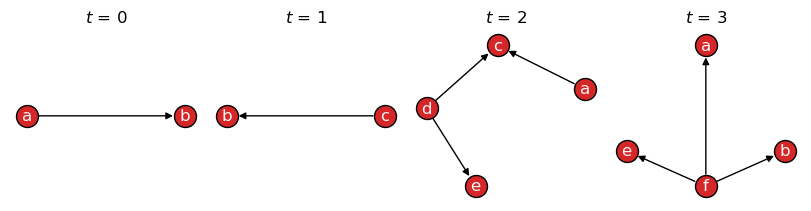
When sliced, draw() will return a plot of each resulting snapshot
in the temporal graph:
>>> tx.draw(TG, layout="kamada_kawai", figsize=(8, 2))
Define number of snapshots
By default, slice()
returns snapshots based on unique attribute values, here \(t \in \{0,1,2,3\}\),
which are stored in the names property
of TemporalGraph objects for future access.
A new object can be created with a specific number of snapshots by setting the
bins parameter:
>>> TG = TG.slice(attr="time", bins=2)
>>> tx.draw(TG, layout="kamada_kawai", figsize=(4, 2), names=True)
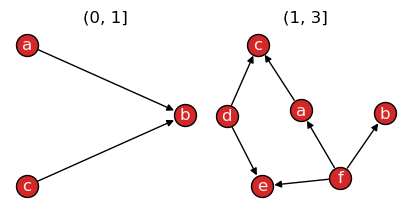
In case slice() is not able to split the graph into
the specified number of bins, for example, due to insufficient data (nodes/edges), the
maximum possible number of snapshots is returned instead.
Cut by snapshot order or size
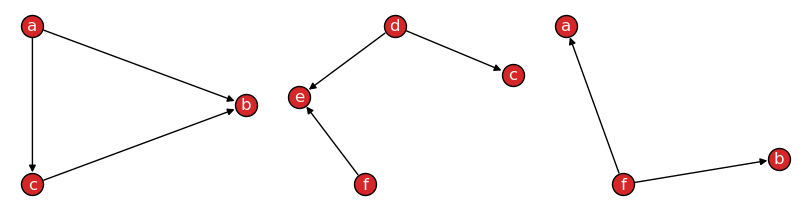
Passing axis=1 to slice()
will bin snapshots based on their number of nodes or edges, as defined by the level
argument, optionally considering temporal information available as their attr, if set:
>>> TG = TG.slice(3, attr="time", axis=1)  # level="edge" (default)
>>> tx.draw(TG, layout="kamada_kawai", figsize=(8, 2), names=False)
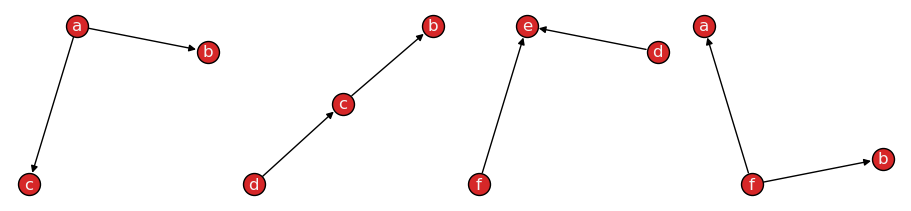
Or, to limit the maximum number of nodes allowed per snapshot, set axis=1 and level='node':
>>> TG = TG.slice(3, axis=1, level="node")
>>> tx.draw(TG, layout="kamada_kawai", figsize=(9, 2), names=False)
Node or edge attributes
By default, the slice() function
considers level="edge" attribute data:
>>> TG = TG.slice(attr="time")  # level="edge" (default)
>>> tx.draw(TG, layout="kamada_kawai", figsize=(8, 2))
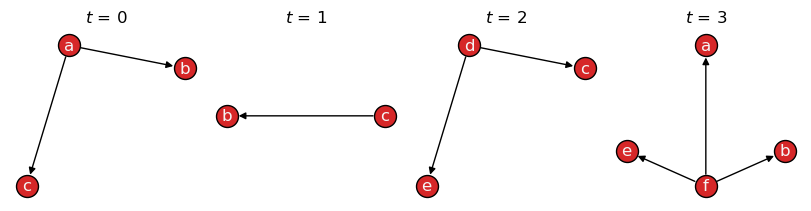
If level='node' is set, node-level attribute data is used to determine snapshots:
>>> TG_node = TG.slice(attr="time", level="node")
>>> tx.draw(TG_node, layout="kamada_kawai", figsize=(8, 2))
Quantile-based cut
Setting qcut=True slices a graph into quantiles, creating snapshots with balanced order and/or
size (nodes/edges). This is useful when interactions are not evenly distributed across time.
For example:
>>> TG = TG.slice(attr="time", bins=2, qcut=True)
>>> tx.draw(TG, layout="kamada_kawai", figsize=(4, 2), names=True)
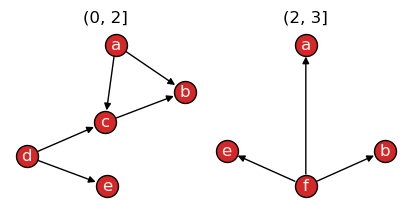
The resulting snapshots have uneven time intervals: \(t=(0,2]\) and \(t=(2,3]\), respectively.
Objects are sorted by their time attribute values and then split into two groups with approximately
the same order (nodes) or size (edges), depending on the level of the attribute passed to the function.
See also
The pandas.qcut documentation for more information on quantile-based discretization.
Rank-based cut
Setting rank_first=True slices a graph considering the order of appearance of edges (default),
nodes, or attributes, forcing each snapshot to have approximately the same number of elements:
>>> TG = TG.slice(bins=2, rank_first=True)
>>> tx.draw(TG, layout="kamada_kawai", figsize=(4, 2), names=True)
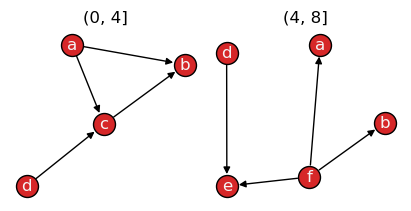
As attr was not set, the graph was split considering the order in which edges were added
to the graph. Notice how each snapshot title now refer to edge intervals: \(e_0\) to \(e_3\)
\((0, 4]\) and \(e_4\) to \(e_7\) \((4, 8]\).
This is useful to obtain an arbitrary number of subgraphs, independent of their temporal dynamics.
See also
The pandas.rank documentation for more information on ranking data.
Propagate snapshots
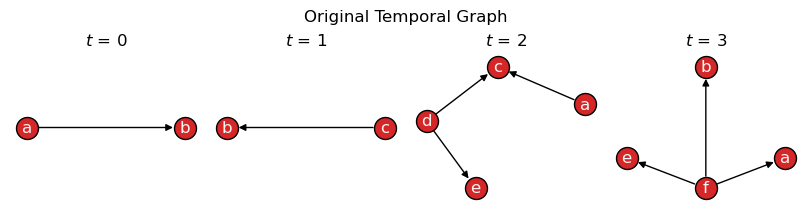
Suppose connections should be instead treated as long-lasting, with future snapshots maintaining
past observed data. The propagate_snapshots() function allows to
merge previous snapshots forward or backward in time. New nodes and edges for each snapshot
are here highlighted in green:
>>> TG = tx.temporal_graph(directed=True)
>>>
>>> TG.add_edge("a", "b", time=0)
>>> TG.add_edge("c", "b", time=1)
>>> TG.add_edge("d", "c", time=2)
>>> TG.add_edge("d", "e", time=2)
>>> TG.add_edge("a", "c", time=2)
>>> TG.add_edge("f", "e", time=3)
>>> TG.add_edge("f", "a", time=3)
>>> TG.add_edge("f", "b", time=3)
>>>
>>> TG = TG.slice(attr="time")
>>>
>>> tx.draw(TG, figsize=(8,2), layout="kamada_kawai", suptitle="Original Temporal Graph")
>>> TG_prop = tx.propagate_snapshots(TG, method="ffill")
>>>
>>> temporal_node_color = [
>>>     ["green" if TG_prop.index_node(n)[0] == t else "tab:red"
>>>      for n in G.nodes()] for t, G in enumerate(TG_prop)]
>>>
>>> temporal_edge_color = [
>>>     ["tab:green" if TG_prop.index_edge((n1, n2))[0] == t else "black"
>>>      for n1, n2 in G.edges()] for t, G in enumerate(TG_prop)]
>>>
>>> tx.draw(TG_prop, figsize=(8, 2), layout="kamada_kawai",
>>>         temporal_node_color=temporal_node_color,
>>>         temporal_edge_color=temporal_edge_color,
>>>         suptitle="Propagated Temporal Graph (ffill)")
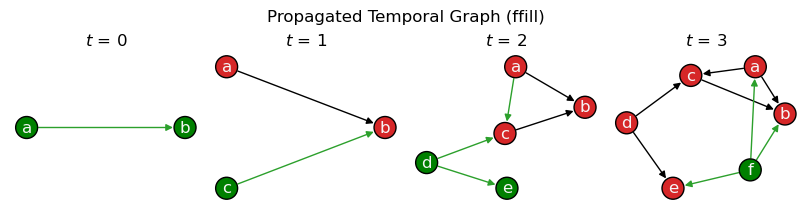
This allows to model scenarios where connections persist over time until removed, which may be useful for the purposes of analyzing and simulating spreading processes, among other applications.
Save and load data
Temporal graphs may be read from or written to a file using
read_graph() and write_graph():
>>> tx.write_graph(TG, "temporal-graph.graphml.zip")
>>> TG = tx.read_graph("temporal-graph.graphml.zip")
Supported formats are the same as those in NetworkX and depend on the version installed.
See also
The read and write documentation from NetworkX for a list of supported graph formats.
Inherited methods
Any methods available from a NetworkX graph
can be called directly from a TemporalGraph object.
For example, the familiar methods below transform edges in the graph into directed or undirected:
>>> TG.to_undirected()

<networkx_temporal.classes.graph.TemporalGraph at 0x7f13dcde4dd0>
>>> TG.to_directed()

<networkx_temporal.classes.digraph.TemporalDiGraph at 0x7f13dcdccdd0>
Note that both methods return new objects when called, so the original graph remains unchanged.
See also
The NetworkX documentation
for a list of methods inherited by a TemporalGraph
object.
Utility functions
Utility functions for temporal graphs are available in the
~networkx_temporal.utils module.
>>> TG = tx.temporal_graph(multigraph=False)
>>>
>>> TG.add_node("a", group=0)
>>> TG.add_node("b", group=1)
>>> TG.add_node("c", group=1)
>>> TG.add_node("d")
>>>
>>> TG.add_edge("a", "b", time=0)
>>> TG.add_edge("b", "c", time=0)
>>> TG.add_edge("a", "d", time=1)
>>>
>>> print(TG)

TemporalGraph (t=1) with 4 nodes and 3 edges
Node and edge attributes
Obtaining node and edge attributes across snapshots:
>>> tx.get_node_attributes(TG, "group")

[{'a': 0, 'b': 1, 'c': 1, 'd': nan}]
>>> tx.get_edge_attributes(TG, "time")

[{('a', 'b'): 0, ('a', 'd'): 1, ('b', 'c'): 0}]
Partition node and edge sets
Partition nodes and edges based on their attribute values per snapshot:
>>> tx.partition_nodes(TG, "group", index=True, default="unknown")

[{0: ['a'], 1: ['b', 'c'], 'unknown': ['d']}]
>>> tx.partition_nodes(TG, "group", index=False)

[[['a'], ['c', 'b'], ['d']]]

>>> tx.partition_edges(TG, "time")

[{0: [('a', 'b'), ('b', 'c')], 1: [('a', 'd')]}]
Mapping node and edge attributes
Mapping edge-level time to nodes, or node-level group to
edges:
>>> tx.map_edge_attr_to_nodes(TG, "time", unique=True)

[{'a': [0, 1], 'b': [0, 0], 'c': [0], 'd': [1]}]
>>> tx.map_node_attr_to_edges(TG, "group", origin="source")

[{('a', 'b'): 0, ('a', 'd'): 0, ('b', 'c'): 1}]
Similarity of node and edge sets
Obtaining a Jaccard similarity matrix (intersection over union) of node sets over time:
>>> snapshots = TG.slice(attr="time")
>>> tx.temporal_node_matrix(snapshots, method="jaccard")

[[1.0, 0.25], [0.25, 1.0]]
See also
The Algorithms and metrics → Temporal evolution examples with similarity matrices.