
Convert and transform
This package provides a set of functions to manipulate graph classes, formats, and representations.
In this context, convert refers to different graph-based libraries,
e.g., igraph, and transform refers to the
underlying data structure used to store object relations, e.g.,
event-based temporal graphs.
See also
All examples in this guide are also available as an interactive Jupyter notebook (open in Colab).
Graph types and classes
The transform module provides functions to convert among different
TemporalGraph types, depending on whether the underlying data
structure allows parallel edges (multigraphs) or not.
Static or temporal multigraphs may be converted to graphs without parallel edges and vice-versa.
>>> import networkx_temporal as tx
>>>
>>> TG = tx.temporal_graph(directed=True)  # tx.TemporalMultiDiGraph
>>>
>>> TG.add_edge("a", "b", time=0)
>>> TG.add_edge("c", "b", time=1)
>>> TG.add_edge("d", "c", time=2)
>>> TG.add_edge("d", "e", time=2)
>>> TG.add_edge("a", "c", time=2)
>>> TG.add_edge("f", "e", time=3)
>>> TG.add_edge("f", "a", time=3)
>>> TG.add_edge("f", "b", time=3)
>>>
>>> print(TG)

TemporalMultiDiGraph (t=1) with 6 nodes and 8 edges
>>> TG.add_edge("c", "b", time=0)   # <-- parallel edge
>>> print(TG)

TemporalMultiDiGraph (t=1) with 6 nodes and 9 edges
The from_multigraph() function combines parallel edges
and sum their weight (default: \(1\)) values. Notice that \((c, b)\) time
is now set to \(0\), as later attribute values take precedence over earlier ones:
>>> TG = tx.from_multigraph(TG)
>>> TG.edge("c", "b")

{0: {'time': 0, 'weight': 2}}
Converting the resulting
TemporalDiGraph
back to a
TemporalMultiDiGraph
does not restore data:
>>> TG = tx.to_multigraph(TG)
>>> print(TG)

TemporalMultiDiGraph (t=1) with 6 nodes and 8 edges
>>> TG.add_edge("c", "b", time=1)   # <-- parallel edge
>>> print(TG)

TemporalMultiDiGraph (t=1) with 6 nodes and 9 edges
Graph representations
Once instantiated, TemporalGraph objects may be transformed into
different representations, depending on the analysis or visualization requirements. Due to the
nature of temporal graphs, some representations may not preserve all the data, such as dynamic node
or edge attributes.
Observe that the total number of returned nodes \(V\) and edges \(E\) after transformation might differ from the number of temporal nodes \(V_T\) and edges \(E_T\), depending on the data and method used:
Representation |
Order |
Size |
Dynamic node attributes |
Dynamic edge attributes |
|---|---|---|---|---|
\(V = V_T\) |
\(E = E_T\) |
❌ |
✔️ |
|
\(V \ge V_T\) |
\(E = E_T\) |
✔️ |
✔️ |
|
\(V = V_T\) |
\(E = E_T\) |
❌ |
❌ |
|
\(V \ge V_T\) |
\(E \ge E_T\) |
✔️ |
✔️ |
(*) Default underlying data structure for temporal graphs with multiple snapshots on
slice().
Static graph
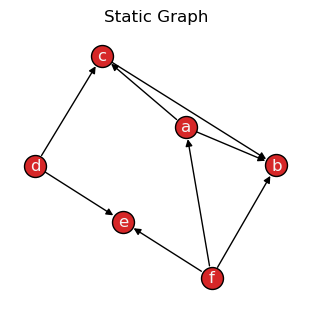
A static graph G is a single graph object containing all the nodes and edges found in the
temporal graph. It is the simplest representation of a network and is the most common type of graph.
Attention
Dynamic node attributes are not preserved when transforming a temporal to a static graph.
TG → G
Transforming a TemporalGraph into a static graph
with the to_static() method:
>>> G = TG.to_static()
>>> print(G)

 DiGraph with 6 nodes and 9 edges
>>> tx.draw(G, layout="kamada_kawai", suptitle="Static Graph")
G → TG
Transforming a static graph into a TemporalGraph
with the from_static() function:
>>> TG = tx.from_static(G)
>>> TG = TG.slice(attr="time")
>>> print(TG)

TemporalDiGraph (t=4) with 6 nodes and 9 edges
Snapshot-based temporal graph
A snapshot-based temporal graph STG is a sequence of graphs where each element represents a
snapshot of the original temporal graph. It is the most common representation of temporal graphs.
Note
Like the slice() method,
to_snapshots() internally returns
views of the original graph data, so no data is copied unless specified otherwise, i.e., by
passing as_view=False to the function.
TG → STG
Transforming a TemporalGraph into a snapshot-based
temporal graph with to_snapshots():
>>> STG = TG.to_snapshots()
>>> STG

[<networkx.classes.graph.Graph at 0x7fd9132420d0>,
 <networkx.classes.graph.Graph at 0x7fd913193710>,
 <networkx.classes.graph.Graph at 0x7fd912906d50>,
 <networkx.classes.graph.Graph at 0x7fd91290d350>]
STG → TG
Transforming a snapshot-based temporal graph into a TemporalGraph with
from_snapshots():
>>> TG = tx.from_snapshots(STG)
>>> print(TG)

TemporalDiGraph (t=4) with 6 nodes and 9 edges
Event-based temporal graph
An event-based temporal graph ETG is a sequence of 3- or 4-tuple edge-based events.
3-tuples (\(u, v, t\)), where elements are the source node, target node, and time attribute;
4-tuples (\(u, v, t, \delta\)), where an additional element \(\delta\) is either an
intfor edge addition (1) or deletion (-1) events, or afloatfor the duration of the interaction (zero for a single snapshot).
Depending on the temporal graph data, one of these may allow a more compact representation than the others. The default is to return a 3-tuple sequence, also known as a stream graph.
Note
As events are edge-based, node isolates are only preserved by means of adding self-loops.
TG → ETG
Transforming a TemporalGraph into an event-based temporal
graph with to_events():
>>> ETG = TG.to_events()  # delta=None
>>> ETG

[('a', 'b', 0),
 ('c', 'b', 1),
 ('a', 'c', 2),
 ('d', 'c', 2),
 ('d', 'e', 2),
 ('f', 'e', 3),
 ('f', 'a', 3),
 ('f', 'b', 3)]
>>> ETG = TG.to_events(delta=int)
>>> ETG

[('a', 'b', 0, 1),
 ('c', 'b', 1, 1),
 ('a', 'b', 1, -1),
 ('a', 'c', 2, 1),
 ('d', 'c', 2, 1),
 ('d', 'e', 2, 1),
 ('c', 'b', 2, -1),
 ('f', 'e', 3, 1),
 ('f', 'a', 3, 1),
 ('f', 'b', 3, 1),
 ('a', 'c', 3, -1),
 ('d', 'c', 3, -1),
 ('d', 'e', 3, -1)]
>>> ETG = TG.to_events(delta=float)
>>> ETG

[('a', 'b', 0, 0.0),
 ('c', 'b', 1, 1.0),
 ('a', 'c', 2, 0.0),
 ('d', 'c', 2, 0.0),
 ('d', 'e', 2, 0.0),
 ('f', 'e', 3, 0.0),
 ('f', 'a', 3, 0.0),
 ('f', 'b', 3, 0.0)]
ETG → TG
Node and edge attributes are not preserved when transforming a graph to a sequence of events,
but topological information is retained, allowing to reconstruct its snapshots with
from_events():
>>> TG = tx.from_events(ETG, directed=True, multigraph=True)
>>> print(TG)

TemporalDiGraph (t=4) with 6 nodes and 9 edges
Unrolled temporal graph
An unrolled temporal graph UTG is a single graph object that contains the original temporal data,
plus additional time-adjacent node copies (from each snapshot) and edge couplings connecting them.
It is mainly useful for certain analysis and visualization tasks, e.g., based on
temporal flows.
See also
For an example with temporal node centrality metrics, see Hyoungshick & Anderson, 2012 [1].
TG → UTG
Transforming a TemporalGraph into an unrolled temporal
graph with to_unrolled():
>>> UTG = TG.to_unrolled(edge_couplings=True)
>>> print(UTG)

DiGraph named 'UnrolledTemporalGraph' with 12 nodes and 14 edges
Let’s draw the resulting graph to visualize the node copies (in black) and edge couplings (dotted):
>>> def draw_unrolled(UTG, **kwargs):
>>>     return tx.draw(
>>>         UTG,
>>>         layout=tx.unrolled_layout,
>>>         labels={n: f"{n.split('_')[0]}$_{n.split('_')[1]}$" for n in UTG.nodes()},
>>>         font_size=10,
>>>         arrowsize=15,
>>>         **kwargs,
>>>     )
>>>
>>> node_color = [
>>>     "tab:red" if int(n.split("_")[1]) == TG.index_node(n.split("_")[0])[0] else "#333"
>>>     for n in UTG.nodes()]
>>>
>>> draw_unrolled(UTG,
>>>               node_color=node_color,
>>>               connectionstyle="arc3,rad=0.25",
>>>               title="Unrolled Temporal Graph")
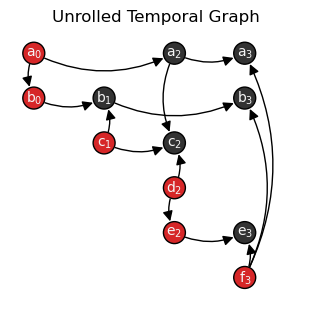
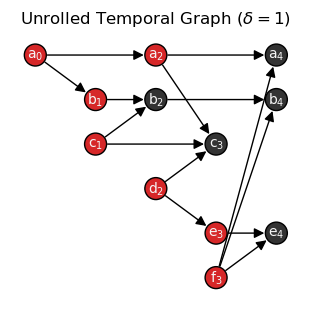
By default, edges connect nodes in the same snapshot, e.g., from \(u_t\) to \(v_t\).
To create edges that connect nodes across time, e.g., from \(u_t\) to
\(v_{t+\delta}\), pass the delta parameter to the function
with the desired edge-level attribute, e.g., delta='duration',
or time difference, e.g., delta=1.
In the following plot with delta=1, nodes that were not present in UTG graph are
colored in black:
>>> UTG_delta = TG.to_unrolled(delta=1)
>>>
>>> node_color = [
>>>     "tab:red" if UTG.has_node(n) else "#333"
>>>     for n in UTG_delta.nodes()]
>>>
>>> tx.draw_unrolled(UTG_delta,
>>>                  node_color=node_color,
>>>                  title="Unrolled Temporal Graph ($\\delta=1$)")
Note
New nodes and edges are created depending on the delta value passed to the
function, leading to graphs of different order and size. For instance, passing
delta=1 in the example above created additional edges among node \(f_3\)
and the temporal node copies \(a_4\), \(b_4\), and \(e_4\).
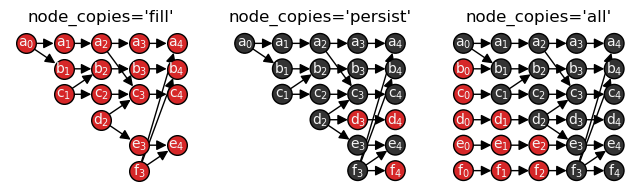
Lastly, the additional parameters edge_couplings and node_copies allow further control over
the creation of temporal node copies and edge couplings. A comparison with newly added nodes in red:
>>> import matplotlib.pyplot as plt
>>>
>>> fig, ax = plt.subplots(nrows=1, ncols=3, figsize=(8, 2))
>>>
>>> UTG_fill = TG.to_unrolled(delta=1, node_copies="fill")
>>> UTG_persist = TG.to_unrolled(delta=1, node_copies="persist")
>>> UTG_all = TG.to_unrolled(delta=1, node_copies="all")
>>>
>>> draw_unrolled(
>>>     UTG_fill,
>>>     node_size=200, fig=fig, ax=0, title="node_copies='fill'")
>>>
>>> draw_unrolled(
>>>     UTG_persist,
>>>     node_color=["#333" if UTG_fill.has_node(n) else "tab:red" for n in UTG_persist.nodes()],
>>>     node_size=200, fig=fig, ax=1, title="node_copies='persist'")
>>>
>>> draw_unrolled(
>>>     UTG_all,
>>>     node_color=["#333" if UTG_persist.has_node(n) else "tab:red" for n in UTG_all.nodes()],
>>>     node_size=200, fig=fig, ax=2, title="node_copies='all'")
UTG → TG
As with events, node and edge attributes are not preserved when unrolling and rerolling graphs,
but their structural information is retained.
Obtanining a TemporalGraph
with from_unrolled():
>>> TG = tx.from_unrolled(UTG)
>>> print(TG)

TemporalDiGraph (t=4) with 6 nodes and 9 edges
External library formats
Support for the following external libraries is currently implemented:
Format |
Parameter (Package) |
Calls (Function) |
|---|---|---|
|
||
|
||
|
||
|
||
|
||
|
||
|
||
|
||
|
||
|
||
|
Graphs may be converted to a different library format with the high-level
convert() function:
>>> tx.convert(TG, "igraph")

[<igraph.Graph at 0x7ff6f1803e40>,
 <igraph.Graph at 0x7ff6f181c040>,
 <igraph.Graph at 0x7ff6f181c140>,
 <igraph.Graph at 0x7ff6f181c240>]
By default, the amount of objects returned match the number of slices (snapshots). To return a single object containing all the nodes and edges found in the temporal graph:
>>> tx.convert(TG.to_static(), "igraph")

<igraph.Graph at 0x7ff6f1803d40>
File readers and writers
Reading and writing temporal graph data to and from external file formats is supported
through the readwrite module.
for which read_graph()
and write_graph()
offer a high-level interface:
>>> tx.write_graph(TG, "temporal-graph.graphml.zip")
>>> TG = tx.read_graph("temporal-graph.graphml.zip")
>>> print(TG)

TemporalDiGraph (t=4) with 6 nodes and 9 edges
File formats supported by the installed version of NetworkX may be used to read and write temporal graph data, including GML, GEXF, GraphML, Pajek, LEDA, and adjacency list formats.
>>> byte_data = tx.write_graph(TG, format="graphml")
>>> TG = tx.read_graph(byte_data)
>>> print(TG)

TemporalDiGraph (t=4) with 6 nodes and 9 edges
See also
The read and write documentation from NetworkX for a list of supported formats and details.
References